Do you want to learn an excellent method of creating social media videos within minutes?
Creating fresh video content daily is a big struggle for any influencer. It takes a lot of time & effort to think about new ideas, shoot clips, and edit them.
In this article, we’ll show you how to use Filmora to make videos using images. It’s an excellent AI picture-to-video generator that will significantly help in your social media content. We’ll show you step by step how to make social media reels. We’ll also discuss how to get maximum reach with these videos on social media.
So let’s start!
Part 1. Why AI Picture to Video is a Must-Have for Social Media Creators
All social media platforms are now dominated by video content. Every unique and eye-catching video immediately gets the attention of viewers. Running a social media channel becomes a lot easier if you know how to convert simple images into videos. You can upload those videos on Instagram, Tiktok, YouTube, Facebook, or any other platform.
Let’s see how learning this skill can help you out.
1. Convert Simple Images into Video Stories
You can use AI Image to Video converters to transform simple photos into complete stories. It’s a lot better for conveying your message and also attracts the attention og the viewer.
2. Save Hours of Editing Time
If you make videos with this AI tool, you don’t need to spend much time on editing. You can make tens of videos in the time it takes to edit a single video.
3. Boost Reach with Platform-Optimized Videos
Every platform has its specific video formats. Instagram takes square or 1:1 videos. While TikTok uses vertical or 9:16 videos. The AI photo-to-video tools can change the aspect ratio of videos with a single click. You can make videos in different formats with a single image.
4. Bring Old Content Back to Life
If you’ve uploaded high-quality images to your account, you can use the same pictures and upload them again as fresh video content. It’s very helpful when you can’t think of new ideas.
5. Experiment with Different Templates
There are different templates for AI Photo and Video Converters. You can experiment with them and see which one attracts your audience’s attention. There’s always an effect that works with a specific audience.
6. No Professional Skills Needed
Even if you don’t have any technical skills, it’s still fine. You must select the settings, and AI will do the rest of your work.
Part 2. The Best AI Picture to Video Generator For Social Media – Filmora
Filmora is the best AI Image-to-Video Generator on the market. It’s a specialized tool for video creation and video editing. Filmora contains multiple AI features that make video creation very simple.
The AI Picture to Video creator of Filmora can make a 10-second eye-catching video from any image. You can apply premade templates to an image or create an effect with a text prompt. This tool is compatible with Android, iOS, Windows, or macOS. You can make videos on your mobile devices or computer systems.
Key Features of Filmora AI Picture to Video Tool
- Adjust Aspect Ratios: Filmora allows you to choose from Landscape (16:9) or Portrait (9:16) dimensions to optimize your videos for specific platforms.
- Library of Templates: Hundreds of premade video templates contain all the viral trends.
- Fine-Tuning: You can adjust multiple settings like image stitching, cropping, or subject centering.
- Multiple Audio & Video Effects: Filmora contains sound effects, transitions, text overlays, and special effects to add to your video.
- Complete Video Editor: After generating video from an image, you can polish the video further with features like auto-caption, TTS, and AI sound effect generation.
- High-Quality Output: The finished videos of Filmora are of top quality, giving a professional feel.
Part 4. How to Create a Social Media Reel with Filmora AI Picture to Video Feature
There are hundreds of templates for making videos from images. You must select a template and upload your photo to apply that effect. Select the Custom Template option and enter a detailed text prompt to make a video from your image.
Let’s look at this process step by step.
Step 1: Open the Image to Video Tool
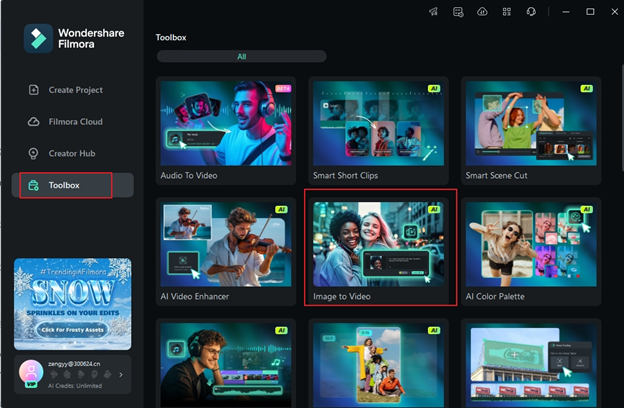
Launch Filmora and go to the Toolbox from the left sidebar. Click on the Image to Video to open this AI-powered feature.
Step 2: Choose a Reel-Style Template
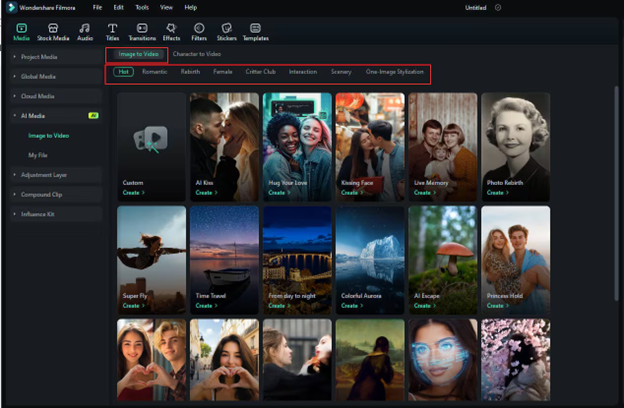
You’ll see many Browse templates like Hug Your Love, AI Fight, or Struck by Lightning in different categories. Select a reel style template and click Create under your chosen template.
Step 3: Upload Your Images
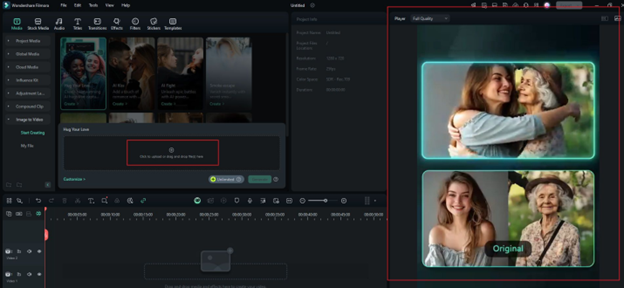
Now, preview the effect of this template. After that, drag and drop your photos into the upload area.
Note: Always use high-quality and eye-catching images to get the best results.
Step 4: Customize for Reels Format
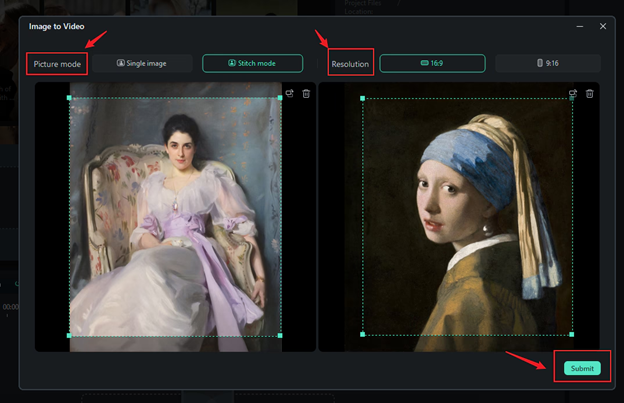
Choose 9:16 (portrait) for the ideal social media reel size. After that, pick between Single Image or Stitch Mode and click Submit once you’ve set your preferences.
Step 5: Generate the AI Reel
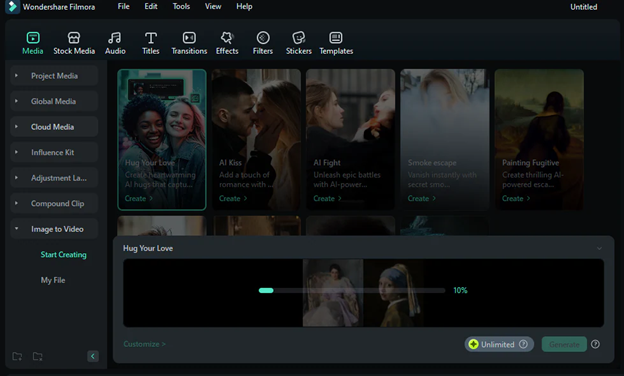
Hit the Generate button, and Filmora will start creating your video. Wait for a few seconds to a couple of minutes till the video creation finishes.
Step 6: Edit and Export Your Reel
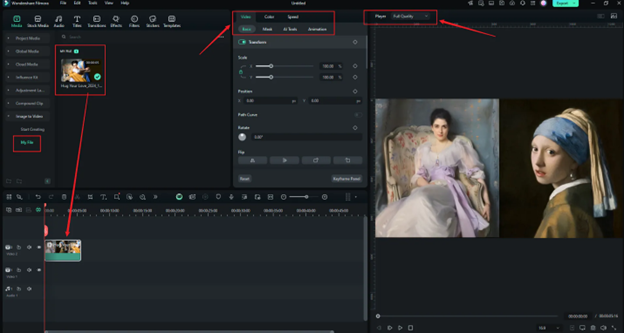
Find your generated video under the “My Files” section. Drag it to the Timeline and add text, audio effects, or adjust timing.
Once you’re done, click Export. Your newly generated AI video is ready for upload on Instagram, TikTok, or YouTube Shorts.
Part 3. Best Practices for Maximizing Reach & Engagement with AI-Generated Reels
Even if you have first-class videos, you can’t just throw them in your social media account however you want. You must focus on hashtags, posting schedule, viewer engagement, etc.
Let’s see how to improve your reach on social media with these practices.
- Use Trending Sounds: A video without audio effects will not be attractive for your audience. Think about what your audience likes and use related sound effects on your videos.
- Post at Optimal Times With Hashtags: Upload videos with related hashtags when your audience is most active. If you run a social media account for some time, you will easily recognize that time.
- Engage with Comments and Interactions: Simply uploading the videos is not enough. Engage with your audience whenever you notice a comment or interaction.
- Incorporate Calls to Action: Always add a suitable call to action at the end of your videos. It encourages the audience to like, comment, follow, and share your content.
- Analyze Performance Metrics to Refine Your Strategy: Every social media platform gives you performance metrics. Use them and learn about what works for your audience.
Conclusion
AI Picture to Video converters are very helpful for making social media content. You can create amazing videos that attract your audience with minimum effort & time. Use the AI Image to Video converter of Filmora. It contains different templates and all other features to convert images into videos.
After you make these videos, upload them at a suitable time and regularly analyze the performance to get maximum results.
Frequently Asked Questions
Q1. Can ChatGPT create social media reels?
No, ChatGPT cannot directly make social media reels. However, you can easily use it to get video ideas, scripts, or captions for your videos. You can even use the paid version of ChatGPT to generate images. Then you can convert those images into social media reels with an AI Picture to Video converter.
Q2. How to create a video with AI?
It depends on the AI tool you are using. Some AI tools will need you to describe the video you want to make in text. Then they will generate the video for you. Some other AI tools can convert images into videos. Some tools use a long video as a source and make multiple short clips from it.
Q3. Can I upload AI videos on YouTube?
Yes, you can upload AI videos on YouTube. However, just ensure that your videos comply with YouTube’s community guidelines. They must be original, free of harmful content, and not mislead the audience.