Console shooters have historically handed you a reticle and left it at that. You might get a colour toggle if the developer was feeling generous, and that was the whole conversation.
Valorant arrived on PS5 with its PC settings menu more or less intact, including a crosshair editor that runs several layers deeper than most players ever look.
It also kept the sharing system, which is the genuinely useful part. A crosshair in Valorant compresses down to a short string of text, and that string behaves identically on a DualSense and on a mouse.
What the Editor Actually Does
The editor exposes inner and outer lines separately, each with its own length, thickness, offset and opacity. Sitting on top of that are outlines, a centre dot, movement and firing error toggles, and separate colour handling.
Most people pick a colour, shrink the thing slightly and stop there. That is a perfectly reasonable choice, though it leaves a good deal of the tool untouched.
The settings that matter most on console are thickness and outline. A thin white crosshair that reads beautifully on a monitor at arm’s length can disappear against a pale wall on a television across the room.
The Codes Are the Clever Bit
Every configuration compresses into a code that can be pasted straight into the settings menu. That makes a crosshair portable, comparable and, more to the point, copyable from somebody who has thought about it far harder than you have.
Databases of professional settings exist for exactly this reason. A collection of Valorant crosshair codes currently covers 505 professional players, with each one rendered as it actually appears in game rather than shown as a screenshot.
The listings carry team affiliation along with a description of colour, size and style, and the current set was refreshed at the end of August. Filters break the collection down by style, separating dot, cross, dot plus cross and outline, as well as colour and whether a centre dot is present.
Recognisable names are all in there, TenZ, aspas and ZmjjKK among them, across more than a hundred teams. The same site runs a crosshair generator with live preview, plus a sensitivity converter and an eDPI calculator for anyone moving between titles.
It is an independent project with no connection to Riot. Copying a code takes about ten seconds, and nothing stops you cycling through half a dozen of them in a single deathmatch.
Console Changed the Problem Slightly
Valorant has been free to play on PlayStation 5 since the beta ended, with console and PC populations kept apart in competitive play. Riot has described the port as the work of taking the game from the keyboard to the sticks.
That separation matters more for settings advice than people realise. A crosshair designed around a mouse is not automatically wrong on a controller, but the reasoning behind it may not carry across.
Stick aim drifts in a way mouse aim simply does not. A slightly larger crosshair with a visible gap is often easier to track with than the pinpoint dot a PC professional tends to favour.
Practical Advice for a Living Room
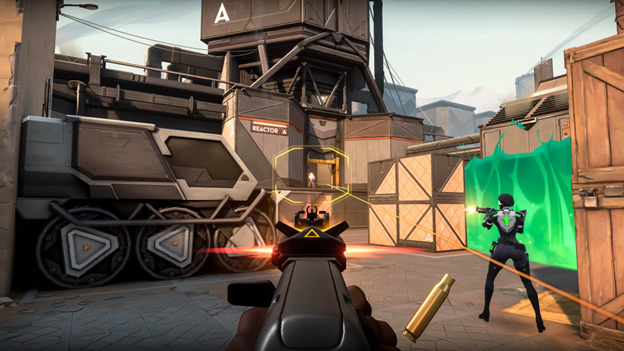
Start by turning the outline on. Viewing distances are longer on a television, and an outline keeps the shape legible against pale surfaces and bright skyboxes alike.
Then check your colour on a bright map rather than a dark one. Cyan and green survive most backgrounds, while white and yellow will both vanish somewhere inconvenient.
Leave firing error off unless you are specifically learning spray control. The extra movement is genuine information, though it is also clutter in the middle of a fight.
What the Pros Are Really Telling You
Copying a professional crosshair is useful mainly as a way of seeing the range of what is possible. Very few of those 505 configurations are exotic, and the clustering around a handful of shapes is the interesting part.
Most sit small, thin and static, because a PC player is optimising for precision at a fixed distance from the screen. That logic weakens the moment you are sitting two metres back with a pad in your hands.
The useful move is to treat a borrowed code as a first draft. Widen it, thicken it, and see whether your tracking improves before deciding the professionals were right.
Where to Look Next
Valorant’s console version has been out long enough now that the settings conversation has matured past copying PC players wholesale. The PS5 coverage of the game follows how the port has developed since the beta closed.
Agent choice, sensitivity and crosshair all interact, and none of them is settled by a single professional’s configuration. Borrowing is a starting point rather than an answer.
Final Thoughts
A crosshair is the one interface element you stare at continuously for an entire match. Spending twenty minutes on it is not fussiness, it is fairly basic housekeeping.
Codes make experimenting close to free, which is the strongest argument for bothering at all. Try several, keep whichever one you stop noticing, and get back to the game.